Rex offers several different tags for a contact's name, and the descriptions in the picker do not always make it obvious which one you want. The quickest way to tell them apart is to see them all filled in from the same record.
This article walks through one example contact, shows what each tag returns, and explains why some of them come back looking the same.
The Example Contact
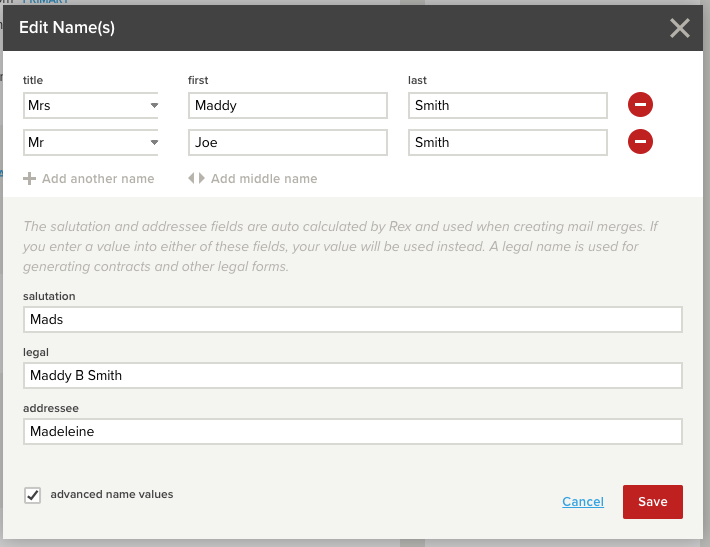
This contact has two people on the one record, entered under Edit Name(s):
| Field | Person 1 | Person 2 |
|---|---|---|
| Title | Mrs | Mr |
| First | Maddy | Joe |
| Last | Smith | Smith |
It also has three name fields filled in that apply to the record as a whole:
| Field | Value |
|---|---|
| Salutation | Mads |
| Legal | Maddy B Smith |
| Addressee | Madeleine |
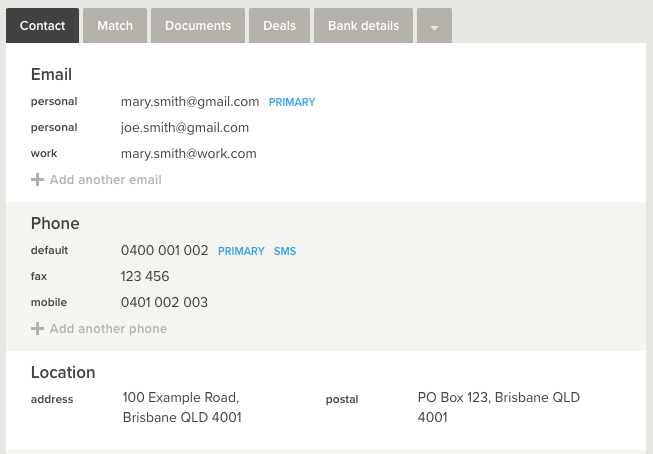
And the following contact details:
| Field | Value |
|---|---|
| Email (primary) | mary.smith@gmail.com |
| Phone (primary, also flagged for SMS) | 0400 001 002 |
| Fax | 123 456 |
| Address | 100 Example Road, Brisbane QLD 4001 |
| Postal address | PO Box 123, Brisbane QLD 4001 |
How Rex Builds Names
Rex works out the salutation and addressee for you, based on the names entered at the top of the record. You only need to fill those fields in if you want something different.
If you do type a value into the salutation or addressee field, Rex uses your value instead of the one it calculated. The legal name field is separate again, and is used for contracts and other legal forms rather than for everyday correspondence.
Please Note: This is the single most useful thing to understand about the name tags. On a record where salutation and addressee have been left blank, the tags return what Rex worked out. On a record where someone has typed a value in, every related tag returns that typed value instead.
What Each Name Tag Returns
Using the example contact above:
| Merge tag | Shown in the picker as | Returns |
|---|---|---|
{{contact:name_title}} |
Title (Mr) | Mrs & Mr |
{{contact:name_first}} |
Salutation names (Bill / JJ Adams Pty Ltd) | Mads |
{{contact:name_salutation}} |
Salutation Name | Mads |
{{contact:name_last}} |
Last names (Thomas / JJ Adams Pty Ltd) | Smith & Smith |
{{contact:name_legal}} |
Legal Name | Maddy B Smith |
{{contact:name_addressee}} |
Addressee Name | Madeleine |
{{contact:name_addressees}} |
Addressees (Mr B Thomas / JJ Adams Pty Ltd) | Madeleine |
{{contact:name_1_full}} |
Name #1 on Contact - Full name | Maddy Smith |
{{contact:name_2_full}} |
Name #2 on Contact - Full name | Joe Smith |
Why Some Tags Return The Same Thing
Looking at the table above, two pairs come back identical:
-
{{contact:name_first}}and{{contact:name_salutation}}both return Mads -
{{contact:name_addressee}}and{{contact:name_addressees}}both return Madeleine
That is because this record has values typed into its salutation and addressee fields. Once those fields are filled in, Rex uses them for every related tag, so the variants all resolve to the same text.
On a record where those fields have been left blank, Rex calculates the values from the names instead, and the tags can return different results. If you are choosing between two similar looking tags, check whether the record you are testing on has those fields filled in, because a record with overrides will hide the difference.
When A Contact Has Two People
Several tags combine both people on the record rather than returning just the first:
-
{{contact:name_title}}returns Mrs & Mr -
{{contact:name_last}}returns Smith & Smith
If you want one person specifically, use {{contact:name_1_full}} or {{contact:name_2_full}}, which return Maddy Smith and Joe Smith.
Please Note: If a record only has one person on it, the combining tags simply return that one person's details, so there is no harm in using them on single-person records.
Address And Contact Detail Tags
| Merge tag | Shown in the picker as | Returns |
|---|---|---|
{{contact:address}} |
Contact's address | 100 Example Road, Brisbane QLD 4001 |
{{contact:postal_address}} |
Contact's postal address | PO Box 123, Brisbane QLD 4001 |
{{contact:address_block}} |
An address block that combines addressees with the postal address | Madeleine, then PO Box 123, Brisbane QLD 4001 on the following line |
The address block tag is the one to use in letters, because it gives you the addressee and the postal address together, already laid out over two lines.
Where a contact has more than one email address or phone number, the tags return whichever one is marked as primary on the record. In this example, {{contact:email}} returns mary.smith@gmail.com and {{contact:phone}} returns 0400 001 002.