On a contact record you can set the contact's "heat" interest level, and toggle their "do not contact" setting. These settings help you manage communications with your contact database.
This article covers setting a contact's interest level, who can see it, and what it does and does not affect.
How Do I Set a Contact's Interest Level?
- Open the contact record.
- Click the edit icon, and the Interest Level dialogue box will appear.
- Choose the interest level and save.
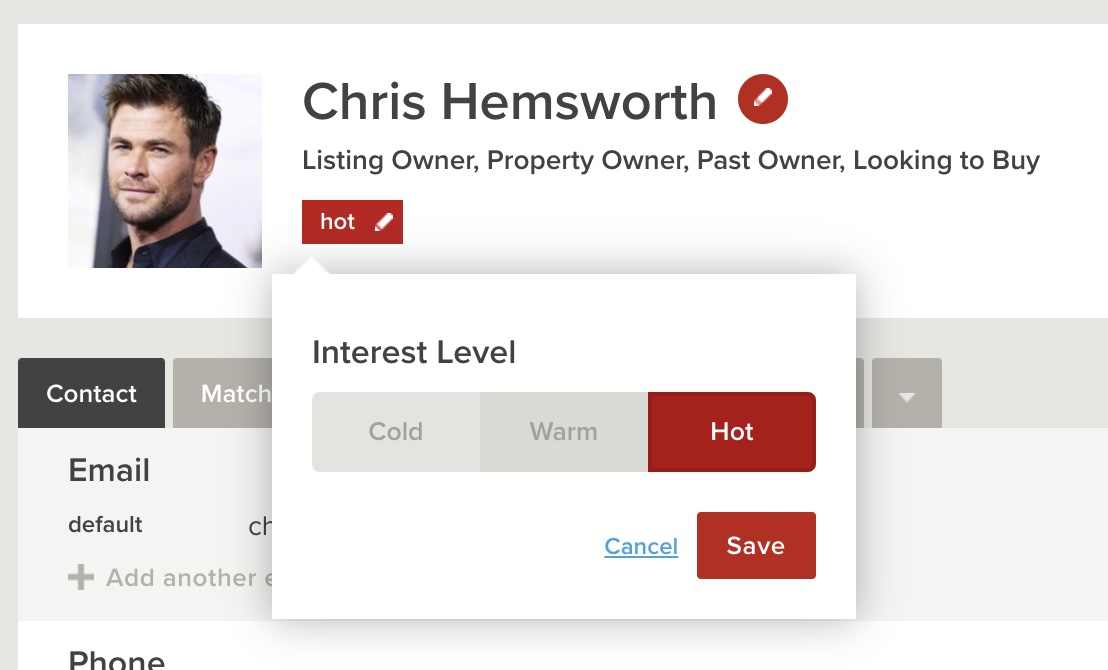
There are three levels to choose from, Hot, Warm and Cold. A contact with no interest level set is simply unrated, and unrated contacts sort last when you order buyers by interest level.
Who Can See a Contact's Interest Level?
Interest level is not only an internal note. As well as your own team seeing it in Rex, it can reach your vendors in two places:
- The Rex Hub vendor portal, where an Interest Level chart and the hot, warm and cold labels appear on the Overview and Feedback pages. Your agency can switch this off, which removes all of it from the portal at once. See Welcome to Rex Hub: Rex Hub Branding & Feature Preference Settings.
- The vendor report, in both the online report and the PDF version. This always shows interest level and is not covered by the Rex Hub setting.
⚠️ Please Note: Worth knowing before you rate a buyer cold. Unless your agency has hidden interest level in the Rex Hub portal, your vendor may see that rating, and it will appear on their vendor report either way.
What Does Interest Level Affect?
Setting an interest level does not trigger anything automatically. It does not start a track, send a communication, or change any automatic process in Rex.
What it does do is help you work through your buyers:
- You can search, filter and sort buyers by interest level
- Buyer Mode shows an interest level chart and tags each note with the level recorded at the time
- Feedback approved for reporting carries its interest level through to vendor reporting
❓ Frequently Asked Questions
Will my vendor see that I marked a buyer as cold?
Possibly. In the Rex Hub portal they will, unless your agency has switched buyer interest level off. On the vendor report they will see it either way, because the Rex Hub setting does not cover reports.
Can I hide interest level from vendors?
Your agency can hide it from the Rex Hub vendor portal, in Rex Hub settings. It is an account-wide setting, not per listing or per contact, and it does not affect the vendor report.
Does setting an interest level do anything automatically?
No. It does not start a track, send anything, or change any automatic process. It is there to help you sort and prioritise your buyers.
What happens if I do not set an interest level?
The contact is unrated. Unrated contacts sort last when you order buyers by interest level, and they are not counted in the hot, warm or cold breakdown.
Can I change a contact's interest level later?
Yes. Click the edit icon on the contact record and choose a different level whenever it changes.
What is the difference between interest level and do not contact?
Interest level records how interested a buyer is. Do not contact stops communications going to them. See The Contact Record: Do Not Contact Functionality on a Contact Record.